Sliderの作成(Editor拡張)2020/08/31修正
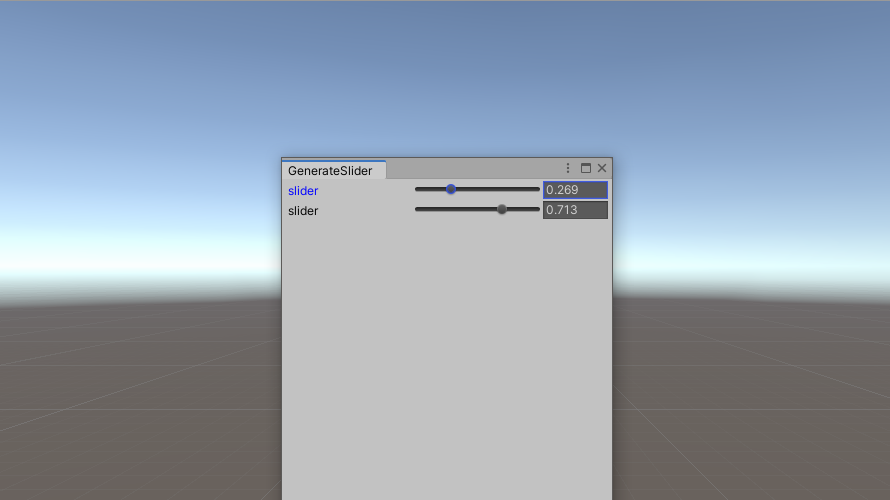
GUIStyleを自由に変更できるようSliderを自作しました。
Label、Slider、FloatFieldを横並びで表示
EditorGUILayout.Sliderによって作成されるコントロール(Label、Slider、FloatField)を別々に作成し、これらを横へ並べることでSliderを作成ます。これにより、各要素へ自由にGUIStyleを設定することができるようになります。
Script
label、Slider及びFloatFieldを作成すると縦並びとなります。よって、EditorGUILayout.BeginHorizontal();とEditorGUILayout.EndHorizontal();の間にlabel、Slider及びFloatFieldを作成し、各コントロールを横並びにします。これにより、各コントロールを分けて記述できるため、コントロールごとにGUIStyleを自由に変更することができます。作成したScriptは以下の通りです。
float Slider(string label, float val, float left_val, float right_val, GUIStyle style_label, GUIStyle style_slider, GUIStyle style_slider_thumb, GUIStyle style_float, Event ev)
{
    EditorGUILayout.BeginHorizontal();
    {
        float val_speed = 0.3f;

        int id = GUIUtility.GetControlID(FocusType.Passive);
        string label_name = label + id.ToString();
        string slider_name = label_name + "_slider";
        string float_name = label_name + "_float_field";

        GUIStyle style_label_temp = new GUIStyle(style_label);
        GUIStyle style_float_temp = new GUIStyle(style_float);
        GUIStyle style_slider_thumb_temp = new GUIStyle(style_slider_thumb);

        string focus_control_name = GUI.GetNameOfFocusedControl();
        if (focus_control_name == float_name)
        {
            style_label_temp.normal.textColor = style_label.focused.textColor;
            style_float_temp.normal.background = style_float.focused.background;
            Repaint();
        }

        if (focus_control_name == slider_name)
        {
            style_label_temp.normal.textColor = style_label.focused.textColor;
            style_float_temp.normal.background = style_float.focused.background;
            style_slider_thumb_temp.normal.background = style_slider_thumb.focused.background;
            Repaint();
        }

        //controls width
        int margin_edge = 3;
        int margin_label_slider = style_slider.margin.left;
        int margin_slider_float = Mathf.Max(style_slider.margin.right, style_float.margin.left);
        int margin = margin_edge * 2 + margin_label_slider + margin_slider_float;
        int float_width = 65;
        int window_width = (int)position.width;
        int label_width = (window_width - margin - float_width) / 2;
        int slider_width = window_width - margin - float_width - label_width;

        //label
        EditorGUILayout.LabelField(label, style_label_temp, GUILayout.Width(label_width));
        Rect rect_label = GUILayoutUtility.GetLastRect();

        //slider
        GUI.SetNextControlName(slider_name);
        val = GUILayout.HorizontalSlider(val, left_val, right_val, style_slider, style_slider_thumb_temp, GUILayout.Width(slider_width));
        val = val * 1000f;
        val = Mathf.Floor(Mathf.Abs(val)) / 1000f * Mathf.Sign(val);
        Rect rect_slider = GUILayoutUtility.GetLastRect();

        //float
        GUI.SetNextControlName(float_name);
        val = EditorGUILayout.FloatField(val, style_float_temp, GUILayout.Width(float_width));

        Vector2 mouse_pos = ev.mousePosition;
        if (ev.button == 0)
        {
            switch (ev.type)
            {
                case EventType.MouseDown:
                    if (rect_label.Contains(mouse_pos))
                    {
                        GUIUtility.hotControl = id;
                        GUI.FocusControl(slider_name);
                        ev.Use();
                    }
                    else if (rect_slider.Contains(mouse_pos))
                    {
                        GUI.FocusControl(slider_name);
                        ev.Use();
                    }

                    break;

                case EventType.MouseDrag:
                    if (GUIUtility.hotControl == id)
                    {
                        float dis = ev.delta.x;
                        val = val * 100.0f + dis * 10.0f * val_speed;
                        val = Mathf.Floor(Mathf.Abs(val)) / 100f * Mathf.Sign(val);
                        val = Mathf.Clamp(val, left_val, right_val);
                        GUI.FocusControl(slider_name);
                        Repaint();
                    }
                    break;

                case EventType.MouseUp:
                    GUIUtility.hotControl = 0;
                    break;
            }
        }
        EditorGUIUtility.AddCursorRect(rect_label, MouseCursor.SlideArrow);
    }
    EditorGUILayout.EndHorizontal();

    return val;
}
各コントロール用の名前を作成します。GUIUtility.GetControlID(FocusType.Passive)によって取得したidを追加することで、同じ名前にならないよう処理をしています。
int id = GUIUtility.GetControlID(FocusType.Passive);
string label_name = label + id.ToString();
string slider_name = label_name + "_slider";
string float_name = label_name + "_float_field";
GUI.GetNameOfFocusedControl()によってFocusされているコントロールの名前を取得し、それに応じてGUIStyleの変更を行っています。
GUIStyle style_label_temp = new GUIStyle(style_label);
GUIStyle style_float_temp = new GUIStyle(style_float);
GUIStyle style_slider_thumb_temp = new GUIStyle(style_slider_thumb);

string focus_control_name = GUI.GetNameOfFocusedControl();
if (focus_control_name == float_name)
{
    style_label_temp.normal.textColor = style_label.focused.textColor;
    style_float_temp.normal.background = style_float.focused.background;
    Repaint();
}

if (focus_control_name == slider_name)
{
    style_label_temp.normal.textColor = style_label.focused.textColor;
    style_float_temp.normal.background = style_float.focused.background;
    style_slider_thumb_temp.normal.background = style_slider_thumb.focused.background;
    Repaint();
}
下記コードで各コントロールの横幅を求めています。FloatFieldの横幅を65へ固定し、残りをlabelとSliderで二等分しています。
int margin_edge = 3;
int margin_label_slider = style_slider.margin.left;
int margin_slider_float = Mathf.Max(style_slider.margin.right, style_float.margin.left);
int margin = margin_edge * 2 + margin_label_slider + margin_slider_float;
int float_width = 65;
int window_width = (int)position.width;
int label_width = (window_width - margin - float_width) / 2;
int slider_width = window_width - margin - float_width - label_width;
先ほど求めたlabelの横幅(label_width)を用いてlabelの作成を行います。
EditorGUILayout.LabelField(label, style_label_temp, GUILayout.Width(label_width));
Rect rect_label = GUILayoutUtility.GetLastRect();
先ほど求めたSliderの横幅(slider_width)を用いてSliderの作成を行います。labelはEditorGUILayoutで作成していますが、Sliderの場合はEditorGUILayoutではGUIStyleを設定することができません。そのため、GUILayoutを用いてSliderを作成しています。また、Sliderによって変更される数値(val)を小数点第三位までとなるように処理をしています。
GUI.SetNextControlName(slider_name);
val = GUILayout.HorizontalSlider(val, left_val, right_val, style_slider, style_slider_thumb_temp, GUILayout.Width(slider_width));
val = val * 1000f;
val = Mathf.Floor(Mathf.Abs(val)) / 1000f * Mathf.Sign(val);
Rect rect_slider = GUILayoutUtility.GetLastRect();
EditorGUILayoutを用いてFloatFieldの作成を行います。
GUI.SetNextControlName(float_name);
val = EditorGUILayout.FloatField(val, style_float_temp, GUILayout.Width(float_width));
ev.mousePositionによりマウスの位置を受け取っています。また、Rect.Containsを用いて、labelもしくはSliderが右クリックされたかを判定しています。labelがクリックされた場合は、idをGUIUtility.hotControlを渡し、SliderをGUI.FocusControlによってFocusします。Sliderがクリックされた場合はSliderをFocusします。そして、マウスドラッグが行われ、かつGUIUtility.hotControlがidであった場合はマウスのx方向の移動量(ev.delta.x)によって数値(val)を変更しています。
Vector2 mouse_pos = ev.mousePosition;
if (ev.button == 0)
{
    switch (ev.type)
    {
        case EventType.MouseDown:
            if (rect_label.Contains(mouse_pos))
            {
                GUIUtility.hotControl = id;
                GUI.FocusControl(slider_name);
                ev.Use();
            } else if (rect_slider.Contains(mouse_pos))
            {
                GUI.FocusControl(slider_name);
                ev.Use();
            }
            break;

        case EventType.MouseDrag:
            if (GUIUtility.hotControl == id)
            {
                float dis = ev.delta.x;
                val = val * 100.0f + dis * 10.0f * val_speed;
                val = Mathf.Floor(Mathf.Abs(val)) / 100f * Mathf.Sign(val);
                val = Mathf.Clamp(val, left_val, right_val);
                GUI.FocusControl(slider_name);
                Repaint();
            }
            break;

        case EventType.MouseUp:
            GUIUtility.hotControl = 0;
            break;
    }
}
実行結果
label、Slider及びFloatFieldを分離したSliderを実行するScriptは以下の通りです。
using System.Collections;
using System.Collections.Generic;
using UnityEngine;
using System.IO;
using UnityEditor;

public class GenerateSlider : EditorWindow
{
    private float value_a = 0, value_b = 0;

    [MenuItem("Tools/GenerateSlider")]
    public static void OpenWindow()
    {
        EditorWindow ed = EditorWindow.GetWindow(typeof(GenerateSlider), false, "GenerateSlider");
        ed.minSize = new Vector2(285, 456);
    }

    void OnGUI()
    {
        Event event_current = Event.current;

        GUIStyle style_label = new GUIStyle(GUI.skin.label);
        style_label.focused.textColor = Color.blue;

        GUISkin gui_skin = (GUISkin)EditorGUIUtility.Load("DarkSkin.guiskin");
        GUIStyle style_float = new GUIStyle(gui_skin.textField);
        GUIStyle style_slider = new GUIStyle(gui_skin.horizontalSlider);
        GUIStyle style_slider_thumb = new GUIStyle(gui_skin.horizontalSliderThumb);

        value_a = Slider("slider", value_a, 0.0f, 1.0f, style_label, style_slider, style_slider_thumb, style_float, event_current);
        value_b = Slider("slider", value_b, 0.0f, 1.0f, style_label, style_slider, style_slider_thumb, style_float, event_current);
    }

    float Slider(string label, float val, float left_val, float right_val, GUIStyle style_label, GUIStyle style_slider, GUIStyle style_slider_thumb, GUIStyle style_float, Event ev)
    {
        ・・・
    }
}
ラベルをドラッグすると、数値の変更とそれに伴うSliderのつまみが移動しています。また、FloatFieldの数値を変更するとSliderの移動ができています。しかし、SliderをクリックしてもSliderへFocusが移っていないことが分かります。
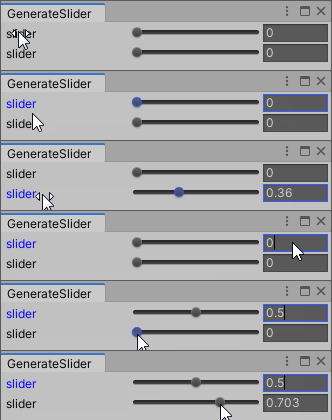
そこで、Event.typeを調べるとSliderをクリック及びドラッグした際にEventType.Usedが発生していました。これにより、Sliderをクリックした際にマウスイベントが取得でないため、Focusを変更することができないようです。
GUIStyle.Drawを用いて作成
先程の問題を解決するため、GUIStyle.Drawを用いてSliderを作成することでFocusをコントロールできるように変更しました。
GUIStyle.Draw
GUIStyle.Drawを用いて画像を表示する場合、画像の大きさはGuiStyle.fixedWidth、GuiStyle.fixedHeight及びGUIStyle.overflowで決定されます。また、GuiStyle.fixedWidthもしくはGuiStyle.fixedHeightが0の場合は、GUIStyle.Drawへ渡すRectのwidthまたはheightによって大きさが決まります。
overflowで調整
fixedWidthまたはfixedHeightで画像の表示される大きさが決定されます。このとき、overflowによって大きさを調整することができます。例えば、fixedHeightが19であり、表示したい画像の高さが5であるとき、overflow.top=-7及びoverflow.bottom=-7を指定とすれば中央に表示できます。

fixedWidthやfixedHeightとRectで調整
fixedWidthやfixedHeightに値を設定し、overflowの各成分を0とするとfixedWidthやfixedHeightの大きさで画像が表示されます。画像の表示位置はGUIStyle.Drawへ渡すRectによって決定されます。先ほどと同様の画像を表示するとき、fixedHeight=5、overflow.top=0及びoverflow.bottom=0とすることで高さ5で画像を表示することができます。この場合、GUIStyle.Drawへ渡すRectのyへ7加算することで下方へ移動させる必要があります。
Rectのみで調整
fixedWidthもしくはfixedHeightが0のとき、画像の大きさはGUIStyle.Drawへ渡すRectのwidthとheightによって決定されます。例えば、fixedHeight=0とした場合、GUIStyle.Drawへ渡すRectのyへ7加算し、さらにheight=5とするとこで、同様に画像を表示できます。
Script
作成したScriptは以下の通りです。
float CustomSlider(string label, float val, float left_val, float right_val, GUIStyle style_label, GUIStyle style_slider, GUIStyle style_slider_thumb, GUIStyle style_float, Event ev)
{
    int control_id = GUIUtility.GetControlID(FocusType.Passive);
    float val_speed = (right_val - left_val) * 0.1f;

    //gui rect
    Rect rect_control = GUILayoutUtility.GetRect(GUIContent.none, style_float);
    int control_height = (int)rect_control.height;
    int margin_left = (int)rect_control.x;
    int margin = 3;
    int float_field_width = 65;
    int slider_width = (int)((rect_control.width - float_field_width - margin * 2) / 2);
    int label_width = (int)(rect_control.width - slider_width - float_field_width - margin * 2);
    int slider_background_height = 6;
    if (style_slider.normal.background != null) slider_background_height = style_slider.normal.background.height;

    //control rect
    Rect rect_label = new Rect(margin_left, rect_control.y, label_width, control_height);
    Rect rect_slider = new Rect(label_width + margin_left + margin, rect_control.y, slider_width, control_height);
    Rect rect_float = new Rect(label_width + slider_width + margin_left + margin * 2, rect_control.y, float_field_width, control_height);

    //slider_thumb rect
    float remap_val = (val - left_val) / (right_val - left_val);
    int slider_thumb_size = 12;
    if (style_slider_thumb.focused.background != null) slider_thumb_size = style_slider_thumb.focused.background.width;
    RectOffset slider_thumb_space = new RectOffset(0, 2, 1, 1);
    int slider_thumb_half_size = slider_thumb_size / 2;

    int rect_slide_area_width = slider_width - slider_thumb_half_size * 2 + slider_thumb_space.left + slider_thumb_space.right;
    Rect rect_slide_area = new Rect(rect_slider.x + slider_thumb_half_size - slider_thumb_space.left, rect_slider.y, rect_slide_area_width, rect_slider.height);
    float slider_pos = Mathf.Lerp(rect_slide_area.x, rect_slide_area.x + rect_slide_area.width, remap_val) - slider_thumb_half_size;
    int slider_thumb_y_pos = (int)(rect_control.y + (rect_control.height - slider_thumb_size + 2) / 2);
    Rect rect_slider_thumb_draw = new Rect(slider_pos, slider_thumb_y_pos, slider_thumb_size, slider_thumb_size);

    //slider overflow
    style_slider.fixedHeight = control_height;
    int overflow_top = (control_height - slider_background_height) / 2;
    style_slider.overflow.top = -overflow_top;
    style_slider.overflow.bottom = overflow_top + slider_background_height - control_height;

    //slider_thumb_overflow
    style_slider_thumb.overflow.top = 0;
    style_slider_thumb.overflow.bottom = 0;

    //control name
    string label_name = label + control_id.ToString();
    string float_name = label_name + "_float";

    int label_id = GUIUtility.GetControlID(FocusType.Passive);
    int slider_id = GUIUtility.GetControlID(FocusType.Passive);
    int slider_thumb_id = GUIUtility.GetControlID(FocusType.Passive);

    bool focus_label = false;

    Vector2 mouse_pos = ev.mousePosition;
    if (ev.button == 0)
    {
        switch (ev.type)
        {
            case EventType.MouseDown:
                if (rect_slider.Contains(mouse_pos))
                {
                    float re_scale = (mouse_pos.x - rect_slide_area.x) / (rect_slide_area.width);
                    val = Mathf.Lerp(left_val, right_val, re_scale);
                    val = val * 1000f;
                    val = Mathf.Floor(Mathf.Abs(val)) / 1000f * Mathf.Sign(val);
                    val = Mathf.Clamp(val, left_val, right_val);
                    GUIUtility.hotControl = slider_thumb_id;
                    GUIUtility.keyboardControl = slider_thumb_id;
                    ev.Use();
                    Repaint();
                }
                else if (rect_label.Contains(mouse_pos))
                {
                    GUIUtility.hotControl = label_id;
                    GUIUtility.keyboardControl = slider_thumb_id;
                    ev.Use();
                    Repaint();
                }
                break;

            case EventType.MouseDrag:
                if (GUIUtility.hotControl == slider_thumb_id)
                {
                    float re_scale = (mouse_pos.x - rect_slide_area.x) / (rect_slide_area.width);
                    val = Mathf.Lerp(left_val, right_val, re_scale);
                    val = val * 1000f;
                    val = Mathf.Floor(Mathf.Abs(val)) / 1000f * Mathf.Sign(val);
                    val = Mathf.Clamp(val, left_val, right_val);
                    Repaint();
                }
                else if (GUIUtility.hotControl == label_id)
                {
                    float dis = ev.delta.x;
                    val = val * 1000f + dis * 100f * val_speed;
                    val = Mathf.Floor(Mathf.Abs(val)) / 1000f * Mathf.Sign(val);
                    val = Mathf.Clamp(val, left_val, right_val);
                    Repaint();
                }
                break;

            case EventType.MouseUp:
                if (GUIUtility.hotControl == slider_thumb_id || GUIUtility.hotControl == label_id)
                {
                    GUIUtility.hotControl = 0;
                }
                break;
        }
    }
    EditorGUIUtility.AddCursorRect(rect_label, MouseCursor.SlideArrow);

    if (GUI.GetNameOfFocusedControl() == float_name || GUIUtility.keyboardControl == slider_thumb_id) focus_label = true;
    //slider and label
    if (ev.type == EventType.Repaint)
    {
        style_label.Draw(rect_label, new GUIContent(label), false, false, false, focus_label);
        style_slider.Draw(rect_slider, GUIContent.none, slider_id);
        style_slider_thumb.Draw(rect_slider_thumb_draw, GUIContent.none, slider_thumb_id);
    }

    //float field
    GUI.SetNextControlName(float_name);
    val = EditorGUI.FloatField(rect_float, val, style_float);

    return val;
}
GUIStyle.Drawを使用してコントロールを作成する場合は、作成するための領域(Rect)を指定する必要があります。そのため、GUILayoutUtility.GetRectでSliderを作成する領域を取得します。GUIStyleを指定した場合、GUIStyleに指定されているmarginやfixedHeight等を元に計算されたRectを取得できます。
Rect rect_control = GUILayoutUtility.GetRect(GUIContent.none, style_float);
marginと各コントロールの横幅とSliderの高さを決定します。margin_leftはSlider全体の左側、marginは各コントロール間のmarginです。また、FloatFieldの大きさは65へ固定し、残りの幅をLabelとSliderで等分します。
Rect rect_control = GUILayoutUtility.GetRect(GUIContent.none, style_slider);
int margin_left = (int)rect_control.x;
int margin = 3;
int float_field_width = 65;
int slider_width = (int)((rect_control.width - float_field_width - margin * 2) * 0.5f);
int slider_height = style_slider.normal.background.height;
int label_width = (int)(rect_control.width  - slider_width - float_field_width - margin * 2);
先ほど求めた幅を元に各コントロールのRectを計算します。rect_slider_drawはSliderを表示するためのRectで、rect_sliderはSliderがクリックされたかを判定するために使用します。
Rect rect_label = new Rect(margin_left, rect_control.y, label_width, control_height);
Rect rect_slider = new Rect(label_width + margin_left + margin, rect_control.y, slider_width, control_height);
int adjust_slider_width = 2; //sliderの画像を少し縮小する
Rect rect_slider_draw = new Rect(label_width + margin_left + margin + adjust_slider_width, rect_control.y, slider_width - adjust_slider_width * 2, control_height);
Rect rect_float = new Rect(label_width + slider_width + margin_left + margin * 2, rect_control.y, float_field_width, control_height);
remap_valはleft_val~right_valを0~1へ変更した場合の数値(val)を計算しています。Sliderのつまみが移動する範囲はSliderの大きさよりつまみの幅だけ縮めます(rect_slide_area)。これらの数値を利用してSliderの左端~右端の座標を線形補間することでSliderのつまみの位置(slider_pos)を計算しています。また、つまみがマウスカーソルの先端に移動するように調整しています。
//slider_thumb rect
float remap_val = (val - left_val) / (right_val - left_val);
int slider_thumb_size = 12;
if (style_slider_thumb.focused.background != null) slider_thumb_size = style_slider_thumb.focused.background.width;
RectOffset slider_thumb_space = new RectOffset(0, 2, 1, 1);
int slider_thumb_half_size = slider_thumb_size / 2;

int rect_slide_area_width = slider_width - slider_thumb_half_size * 2 + slider_thumb_space.left + slider_thumb_space.right;
Rect rect_slide_area = new Rect(rect_slider.x + slider_thumb_half_size - slider_thumb_space.left, rect_slider.y, rect_slide_area_width, rect_slider.height);
float slider_pos = Mathf.Lerp(rect_slide_area.x, rect_slide_area.x + rect_slide_area.width, remap_val) - slider_thumb_half_size;
int slider_thumb_y_pos = (int)(rect_control.y + (rect_control.height - slider_thumb_size + 2) / 2);
Rect rect_slider_thumb_draw = new Rect(slider_pos, slider_thumb_y_pos, slider_thumb_size, slider_thumb_size);
LabelやSliderへ割り当てるIDを取得し、FloatFieldの名前を作成します。また、focus_labelによってlabelの色を変更します。
//control name
string float_name = label + control_id + "_float";

//id
int label_id = GUIUtility.GetControlID(FocusType.Passive);
int slider_thumb_id = GUIUtility.GetControlID(FocusType.Passive);

bool focus_label = false;
keyboardControlがSliderのつまみのidとなったときLabelとFloatFieldのfocusされた時の色または画像へ変更しています。また、FloatFieldがFocusされた時、Labelの色が変更されるようにしています。
if (GUI.GetNameOfFocusedControl() == float_name || GUIUtility.keyboardControl == slider_thumb_id) focus_label = true;
if (GUIUtility.keyboardControl == slider_thumb_id) style_float_temp.normal = style_float.focused;
右クリックもしくはドラッグされた場合におけるSliderとFloatFieldの動作を記述しています。Sliderがクリックもしくはドラッグされた場合は、マウスカーソルの位置に応じて数値を変更します。また、FloatFieldがドラッグされた場合、ドラッグされた距離に応じて数値を変更します。
Vector2 mouse_pos = ev.mousePosition;
if (ev.button == 0)
{
    switch (ev.type)
    {
        case EventType.MouseDown:
            if (rect_slider.Contains(mouse_pos))
            {
                float re_scale = (mouse_pos.x - rect_slide_area.x) / (rect_slide_area.width);
                val = Mathf.Lerp(left_val, right_val, re_scale);
                val = val * 1000f;
                val = Mathf.Floor(Mathf.Abs(val)) / 1000f * Mathf.Sign(val);
                val = Mathf.Clamp(val, left_val, right_val);
                GUIUtility.hotControl = slider_thumb_id;
                GUIUtility.keyboardControl = slider_thumb_id;
                ev.Use();
                Repaint();
            }
            else if (rect_label.Contains(mouse_pos))
            {
                GUIUtility.hotControl = label_id;
                GUIUtility.keyboardControl = slider_thumb_id;
                ev.Use();
                Repaint();
            }
            break;

        case EventType.MouseDrag:
            if (GUIUtility.hotControl == slider_thumb_id)
            {
                float re_scale = (mouse_pos.x - rect_slide_area.x) / (rect_slide_area.width);
                val = Mathf.Lerp(left_val, right_val, re_scale);
                val = val * 1000f;
                val = Mathf.Floor(Mathf.Abs(val)) / 1000f * Mathf.Sign(val);
                val = Mathf.Clamp(val, left_val, right_val);
                Repaint();
            }
            else if (GUIUtility.hotControl == label_id)
            {
                float dis = ev.delta.x;
                val = val * 1000f + dis * 100f * val_speed;
                val = Mathf.Floor(Mathf.Abs(val)) / 1000f * Mathf.Sign(val);
                val = Mathf.Clamp(val, left_val, right_val);
                Repaint();
            }
            break;

        case EventType.MouseUp:
            if (GUIUtility.hotControl == slider_thumb_id || GUIUtility.hotControl == label_id)
            {
                GUIUtility.hotControl = 0;
            }
            break;
    }
}
求めたRect等を用いてLabel、Slider及びFloatFieldを作成します。GUIStyle.DrawはRepaint時のみ実行されるため、if文によりRepaint時のみGUIStyle.Drawが実行されるよう処理をしています。
//slider and label
if (ev.type == EventType.Repaint)
{
    style_label.Draw(rect_label, new GUIContent(label), false, false, false, focus_label);
    style_slider.Draw(rect_slider_draw, GUIContent.none, false, false, false, false);
    style_slider_thumb.Draw(rect_slider_thumb, GUIContent.none, slider_thumb_id);
}

//float field
GUI.SetNextControlName(float_name);
val = EditorGUI.FloatField(rect_float, val, style_float_temp);
実行結果
GUIStyle.Drawを用いて作成したSliderを実行するScriptは以下の通りです。
using System.Collections;
using System.Collections.Generic;
using UnityEngine;
using System.IO;
using UnityEditor;

public class GenerateSlider : EditorWindow
{
    private float value_a = 0, value_b = 0;

    [MenuItem("Tools/GenerateSlider")]
    public static void OpenWindow()
    {
        EditorWindow ed = EditorWindow.GetWindow(typeof(GenerateSlider), false, "GenerateSlider");
        ed.minSize = new Vector2(285, 456);
    }

    void OnGUI()
    {
        Event event_current = Event.current;

        GUIStyle style_label = new GUIStyle(GUI.skin.label);
        style_label.focused.textColor = Color.blue;

        GUISkin gui_skin = (GUISkin)EditorGUIUtility.Load("DarkSkin.guiskin");
        GUIStyle style_float = new GUIStyle(gui_skin.textField);
        GUIStyle style_slider = new GUIStyle(gui_skin.horizontalSlider);
        GUIStyle style_slider_thumb = new GUIStyle(gui_skin.horizontalSliderThumb);

        value_a = CustomSlider("slider", value_a, 0.0f, 1.0f, style_label, style_slider, style_slider_thumb, style_float, event_current);
        value_b = CustomSlider("slider", value_b, 0.0f, 1.0f, style_label, style_slider, style_slider_thumb, style_float, event_current);
    }

    float CustomSlider(string label, float val, float left_val, float right_val, GUIStyle style_label, GUIStyle style_slider, GUIStyle style_slider_thumb, GUIStyle style_float, Event ev)
    {
        ・・・
    }
}
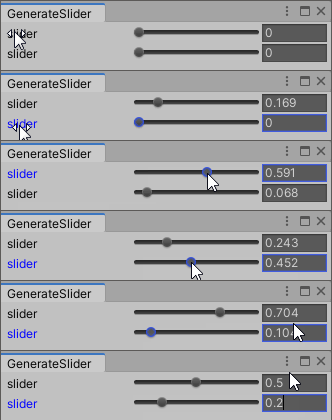
前述のScriptではSliderをクリックした際、Focusを移すことができませんでした。GUIStyle.Drawを用いて作成したSliderではFocusを移すことができていることが分かります。また、他の機能も問題なく動作していることが分かります。
修正履歴
2020/08/31
・スライダーのGUIStyleにおけるfixedHeightをコントロールの高さに合わせて調整(style_slider.fixedHeight = control_height;)
・スライダーのつまみ用画像の左右(1px)と下部(2px)に隙間があるため、つまみの位置を画像の隙間を考慮した計算方法へ変更
2020/08/09
・GUIStyle.Drawに関する説明文の変更
・ラベルをGUI.LabelからGUIStyle.Drawへ変更
・クリックによる動作部分(if (ev.button == 0・・・))とコントロール作成部分の順序を逆に変更
-
前の記事
FloatFieldの作成(Editor拡張)2020/07/11修正 2020.05.17
-
次の記事
ラジオボタンの作成(Editor拡張) 2020.07.01