ポップアップウィンドウの作成(Editor拡張)
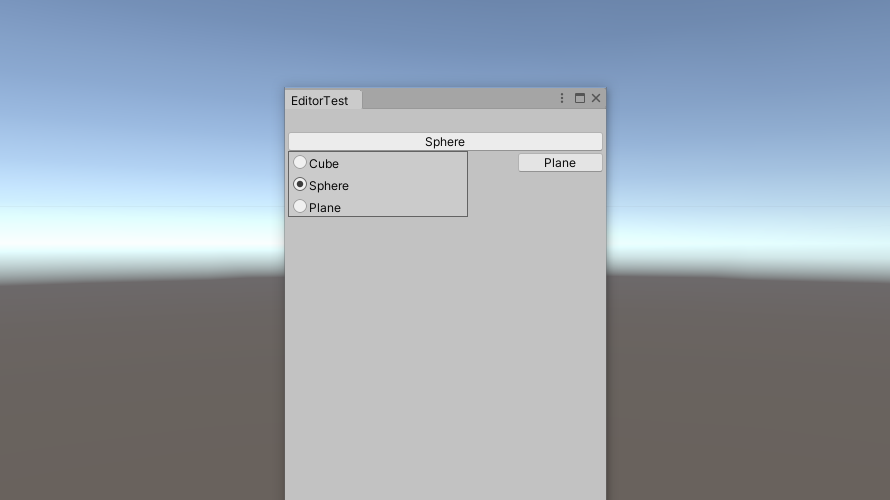
Editor拡張でポップアップウィンドウ作成する方法です。
その1
PopupWindowContentを継承したクラスを作成し、これをPopupWindow.Showでポップアップウィンドウとして開きます。
Script
下記Scriptでは、表示されたボタンを押すとポップアップウィンドウが開きます。このポップアップウィンドウ内に前回作成したラジオボタンを表示し、選択したボタンのインデックスを取得できるようにしています。
using System.Collections;
using System.Collections.Generic;
using UnityEditor;
using UnityEngine;

public enum PopUpPosition
{
    Left,
    Center,
    Right
}

public class EditorPopUp : PopupWindowContent
{
    private string[] m_button_names;
    private System.Action m_callback;
    private int m_selected;
    private Rect m_rect_window;
    private GUIStyle m_style_label;

    public EditorPopUp(Rect rect_window, int selected, string[] toggle_name, GUIStyle style_label, System.Action callback)
    {
        m_button_names = toggle_name;
        m_callback = callback;
        m_selected = selected;
        m_rect_window = rect_window;
        m_style_label = style_label;
    }

    public static void Create(int selected, string[] button_names, GUIStyle style_label, GUIStyle style_button, PopUpPosition popup_position, System.Action callback)
    {
        Rect rect_button = GUILayoutUtility.GetRect(GUIContent.none, style_button);

        if (GUI.Button(rect_button, button_names[selected]))
        {
            int margin_top = new GUIStyle(EditorStyles.radioButton).margin.top;
            int size = button_names.Length;
            int window_line_height = (int)style_label.fixedHeight;
            if (window_line_height <= 0) window_line_height = 18;
            int window_width = 180;
            int window_height = (size * window_line_height) + ((size + 1) * margin_top);
            int window_x;
            int window_y = (int)rect_button.y + (int)rect_button.height - window_height;

            switch (popup_position)
            {
                case PopUpPosition.Left:
                    window_x = (int)rect_button.x;
                    break;

                case PopUpPosition.Center:
                    window_x = (int)rect_button.x - (window_width - (int)rect_button.width) / 2;
                    break;

                case PopUpPosition.Right:
                    window_x = (int)rect_button.x - (window_width - (int)rect_button.width);
                    break;

                default:
                    window_x = (int)rect_button.x;
                    break;
            }

            Rect rect_window = new Rect(window_x, window_y, window_width, window_height);
            var popup_content = new EditorPopUp(rect_window, selected, button_names, style_label, callback);
            PopupWindow.Show(rect_window, popup_content);
        }
    }

    public static void Create(string label, int selected, string[] button_names, GUIStyle style_label, GUIStyle style_button, PopUpPosition popup_position, System.Action callback)
    {
        Rect rect_control = GUILayoutUtility.GetRect(GUIContent.none, style_button);

        GUILayout.BeginHorizontal();
        {
            int margin = 3;
            int button_width = 85;
            int label_width = (int)rect_control.width - button_width - margin;

            Rect rect_label = new Rect(rect_control) { width = label_width };
            EditorGUI.LabelField(rect_label, label, style_label);

            Rect rect_button = new Rect(rect_control) { x = rect_control.x + label_width + margin, width = button_width };

            if (GUI.Button(rect_button, button_names[selected], style_button))
            {
                int margin_top = new GUIStyle(EditorStyles.radioButton).margin.top;
                int size = button_names.Length;
                int window_line_height = (int)style_label.fixedHeight;
                if (window_line_height <= 0) window_line_height = 18;
                int window_width = 120;
                int window_height = (size * window_line_height) + ((size + 1) * margin_top);
                int window_x;
                int window_y = (int)rect_button.y + (int)rect_button.height - window_height;

                switch (popup_position)
                {
                    case PopUpPosition.Left:
                        window_x = (int)rect_button.x;
                        break;

                    case PopUpPosition.Center:
                        window_x = (int)rect_button.x - (window_width - button_width) / 2;
                        break;

                    case PopUpPosition.Right:
                        window_x = (int)rect_button.x - (window_width - button_width);
                        break;

                    default:
                        window_x = (int)rect_button.x;
                        break;
                }

                Rect rect_window = new Rect(window_x, window_y, window_width, window_height);
                var popup_content = new EditorPopUp(rect_window, selected, button_names, style_label, callback);
                PopupWindow.Show(rect_window, popup_content);
            }
        }
        GUILayout.EndHorizontal();
    }

    public override Vector2 GetWindowSize()
    {
        return new Vector2(m_rect_window.width, m_rect_window.height);
    }

    public override void OnGUI(Rect rect)
    {
        if (m_button_names.Length == 0) return;

        GUIStyle style_radio = new GUIStyle(EditorStyles.radioButton);

        m_selected = CustomEditorGUILayout.RadioButton(m_button_names, m_selected, m_style_label, style_radio, Event.current, this.editorWindow);
        m_callback?.Invoke(m_selected);
    }
}
ラベルなし
ポップアップウィンドウを開くためのボタンのみを表示し、ボタンが押されると、ポップアップウィンドウが開くScriptです。
public static void Create(int selected, string[] button_names, GUIStyle style_label, GUIStyle style_button, PopUpPosition popup_position, System.Actioncallback) { Rect rect_button = GUILayoutUtility.GetRect(GUIContent.none, style_button); if (GUI.Button(rect_button, button_names[selected])) { int margin_top = new GUIStyle(EditorStyles.radioButton).margin.top; int size = button_names.Length; int window_line_height = (int)style_label.fixedHeight; if (window_line_height <= 0) window_line_height = 18; int window_width = 180; int window_height = (size * window_line_height) + ((size + 1) * margin_top); int window_x; int window_y = (int)rect_button.y + (int)rect_button.height - window_height; switch (popup_position) { case PopUpPosition.Left: window_x = (int)rect_button.x; break; case PopUpPosition.Center: window_x = (int)rect_button.x - (window_width - (int)rect_button.width) / 2; break; case PopUpPosition.Right: window_x = (int)rect_button.x - (window_width - (int)rect_button.width); break; default: window_x = (int)rect_button.x; break; } Rect rect_window = new Rect(window_x, window_y, window_width, window_height); var popup_content = new EditorPopUp(rect_window, selected, button_names, style_label, callback); PopupWindow.Show(rect_window, popup_content); } }
下記のコードにより、ボタンを作成する際に使用するRectを取得します。
Rect rect_button = GUILayoutUtility.GetRect(GUIContent.none, style_button);
先ほど取得したRectを用いてボタンを作成します。ボタンが押された時、if文内のコードが実行されます。
if (GUI.Button(rect_button, button_names[selected]))
{
    ・・・
}
以下のコードで、作成するポップアップウィンドウの大きさと位置を計算しています。
int margin_top = new GUIStyle(EditorStyles.radioButton).margin.top;
int size = button_names.Length;
int window_line_height = (int)style_label.fixedHeight;
if (window_line_height <= 0) window_line_height = 18;
int window_width = 180;
int window_height = (size * window_line_height) + ((size + 1) * margin_top);
int window_x;
int window_y = (int)rect_button.y + (int)rect_button.height - window_height;
switch文によってポップアップウィンドウが表示される位置を変更しています。
switch (popup_position)
{
    case PopUpPosition.Left:
        window_x = (int)rect_button.x;
        break;

    case PopUpPosition.Center:
        window_x = (int)rect_button.x - (window_width - (int)rect_button.width) / 2;
        break;

    case PopUpPosition.Right:
        window_x = (int)rect_button.x - (window_width - (int)rect_button.width);
        break;

    default:
        window_x = (int)rect_button.x;
        break;
}
先程計算したポップアップウィンドウのサイズと表示位置からRectを作成し、さらに、ポップアップウィンドウのインスタンスを作成します。これらを用いてPopupWindow.Showでポップアップウィンドウを開きます。
Rect rect_window = new Rect(window_x, window_y, window_width, window_height);
var popup_content = new EditorPopUp(rect_window, selected, button_names, style_label, callback);
PopupWindow.Show(rect_window, popup_content);
ラベルあり
ラベルを表示するために以下に示す部分が変更されています。それ以外の部分はラベルなしの場合と同様です。
int margin = 3;
int button_width = 85;
int label_width = (int)rect_control.width - button_width - margin;

Rect rect_label = new Rect(rect_control) { width = label_width };
EditorGUI.LabelField(rect_label, label, style_label);

Rect rect_button = new Rect(rect_control) { x = rect_control.x + label_width + margin, width = button_width };
ポップアップウィンドウ部分
これより記述するコードがポップアップウィンドウを描画するためのコードとなります。GetWindowSize()でポップアップウィンドウの大きさを決めています。
public override Vector2 GetWindowSize()
{
    return new Vector2(m_rect_window.width, m_rect_window.height);
}
そして、ポップアップウィンドウで表示したい内容はOnGUI()へ記述します。CustomEditorGUILayout.RadioButton()によってラジオボタンを作成し、m_callback?.Invoke(m_selected)を実行することで、選択されているラジオボタンのインデックスを取得しています。
public override void OnGUI(Rect rect)
{
    if (m_button_names.Length == 0) return;

    GUIStyle style_radio = new GUIStyle(EditorStyles.radioButton);

    m_selected = CustomEditorGUILayout.RadioButton(m_button_names, m_selected, m_style_label, style_radio, Event.current, this.editorWindow);
    m_callback?.Invoke(m_selected);
}
実行結果
以上のScriptを用いてポップアップウィンドウを作成するScriptは以下の通りです。コールバック関数はインデックスを取得するだけの処理となっています。
using System.Collections;
using System.Collections.Generic;
using UnityEngine;
using UnityEditor;

public class EditorTest : EditorWindow
{
    private int selected = 0;
    private int s_selected = 0;

    [MenuItem("Tools/EditorTest")]
    public static void OpenWindow()
    {
        EditorWindow ed = EditorWindow.GetWindow(typeof(EditorTest), false, "EditorTest");
        ed.minSize = new Vector2(285, 456);
    }

    private void OnGUI()
    {
        string[] enum_name = { "Cube", "Sphere", "Plane" };
        int[] enum_value = { 1, 3, 5 };

        GUIStyle style_label = new GUIStyle(GUI.skin.label);
        style_label.focused.textColor = Color.blue;
        GUIStyle style_button = new GUIStyle(GUI.skin.button);

        Rect rect = GUILayoutUtility.GetRect(GUIContent.none, style_button);
        GUI.Button(rect, "button");

        EditorPopUp.Create(selected, enum_name, style_label, style_button, PopUpPosition.Left, x => selected = x);
        EditorPopUp.Create("Primitive", s_selected, enum_name, style_label, style_button, PopUpPosition.Left, x => s_selected = x);
    }
}
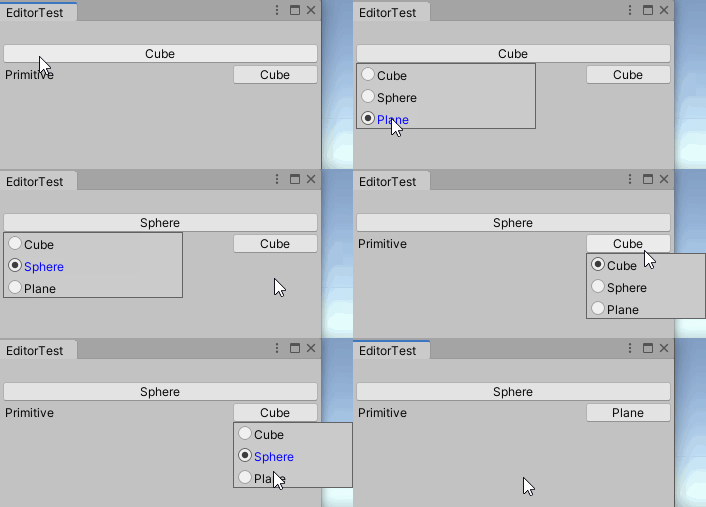
以下の画像より、問題なく動作していることが分かります。
その2
その1ではコールバック関数を用いて、ラジオボタンのインデックスを取得していました。その2では、インデックスをメソッドの返り値として受け取れるようにしました。
Script
作成したScriptは以下の通りです。ウィンドウの大きさの計算やボタンの作成部分はその1のScriptと同様です。
using System.Collections;
using System.Collections.Generic;
using UnityEditor;
using UnityEngine;

public class EditorPopUpWindow : PopupWindowContent
{
    private string[] m_button_names;
    private int m_selected;
    private Rect m_rect_window;
    private PopUpInfo m_instance;

    private GUIStyle m_style_label;

    public EditorPopUpWindow(Rect rect_window, int selected, string[] button_names, GUIStyle style_label, PopUpInfo instance)
    {
        m_button_names = button_names;
        m_selected = selected;
        m_rect_window = rect_window;
        m_instance = instance;
        m_style_label = style_label;
    }

    public static int Create(int selected, string[] button_names, GUIStyle style_label, GUIStyle style_button, PopUpPosition popup_position)
    {
        int control_id = GUIUtility.GetControlID(FocusType.Passive);
        selected = PopUpInfo.GetSelectedValue(control_id, selected);

        Rect rect_button = GUILayoutUtility.GetRect(GUIContent.none, style_button);

        if (GUI.Button(rect_button, button_names[selected]))
        {
            int margin_top = new GUIStyle(EditorStyles.radioButton).margin.top;
            int size = button_names.Length;
            int window_line_height = (int)style_label.fixedHeight;
            if (window_line_height <= 0) window_line_height = 18;
            int window_width = 180;
            int window_height = (size * window_line_height) + ((size + 1) * margin_top);
            int window_x;
            int window_y = (int)rect_button.y + (int)rect_button.height - window_height;

            switch (popup_position)
            {
                case PopUpPosition.Left:
                    window_x = (int)rect_button.x;
                    break;

                case PopUpPosition.Center:
                    window_x = (int)rect_button.x - (window_width - (int)rect_button.width) / 2;
                    break;

                case PopUpPosition.Right:
                    window_x = (int)rect_button.x - (window_width - (int)rect_button.width);
                    break;

                default:
                    window_x = (int)rect_button.x;
                    break;
            }

            PopUpInfo.instance = new PopUpInfo(control_id);
            PopUpInfo.instance.SetSelectedValue(selected);

            Rect rect_window = new Rect(window_x, window_y, window_width, window_height);
            var popup_content = new EditorPopUpWindow(rect_window, selected, button_names, style_label, PopUpInfo.instance);
            PopupWindow.Show(rect_window, popup_content);
        }
        return selected;
    }
    public static int Create(string label, int selected, string[] button_names, GUIStyle style_label, GUIStyle style_button, PopUpPosition popup_position)
    {
        int control_id = GUIUtility.GetControlID(FocusType.Passive);
        selected = PopUpInfo.GetSelectedValue(control_id, selected);

        Rect rect_control = GUILayoutUtility.GetRect(GUIContent.none, style_button);

        int margin = 3;
        int button_width = 85;
        int label_width = (int)rect_control.width - button_width - margin;

        Rect rect_label = new Rect(rect_control) { width = label_width };
        EditorGUI.LabelField(rect_label, label, style_label);

        Rect rect_button = new Rect(rect_control) { x = rect_control.x + label_width + margin, width = button_width };

        if (GUI.Button(rect_button, button_names[selected], style_button))
        {
            int margin_top = new GUIStyle(EditorStyles.radioButton).margin.top;
            int size = button_names.Length;
            int window_line_height = (int)style_label.fixedHeight;
            if (window_line_height <= 0) window_line_height = 18;
            int window_width = 120;
            int window_height = (size * window_line_height) + ((size + 1) * margin_top);
            int window_x;
            int window_y = (int)rect_button.y + (int)rect_button.height - window_height;

            switch (popup_position)
            {
                case PopUpPosition.Left:
                    window_x = (int)rect_button.x;
                    break;

                case PopUpPosition.Center:
                    window_x = (int)rect_button.x - (window_width - button_width) / 2;
                    break;

                case PopUpPosition.Right:
                    window_x = (int)rect_button.x - (window_width - button_width);
                    break;

                default:
                    window_x = (int)rect_button.x;
                    break;
            }

            PopUpInfo.instance = new PopUpInfo(control_id);
            PopUpInfo.instance.SetSelectedValue(selected);
            Rect rect_window = new Rect(window_x, window_y, window_width, window_height);
            var popup_content = new EditorPopUpWindow(rect_window, selected, button_names, style_label, PopUpInfo.instance);
            PopupWindow.Show(rect_window, popup_content);
        }
        return selected;
    }

    public override Vector2 GetWindowSize()
    {
        return new Vector2(m_rect_window.width, m_rect_window.height);
    }

    public override void OnGUI(Rect rect)
    {
        if (m_button_names.Length == 0) return;

        GUIStyle style_radio = new GUIStyle(EditorStyles.radioButton);
        m_selected = CustomEditorGUILayout.RadioButton(m_button_names, m_selected, m_style_label, style_radio, Event.current, this.editorWindow);

        if (m_instance != null) PopUpInfo.instance.SetSelectedValue(m_selected);
    }
}

public class PopUpInfo
{
    public static PopUpInfo instance = null;
    private int id;
    private int m_selected;

    public PopUpInfo(int control_id)
    {
        id = control_id;
    }

    public static int GetSelectedValue(int control_id, int selected)
    {
        if (instance == null)
        {
            return selected;
        }

        if (instance.id == control_id)
        {
            selected = instance.m_selected;
        }
        return selected;
    }

    public void SetSelectedValue(int selected)
    {
        m_selected = selected;
    }
}
ラベルなし
ポップアップウィンドウを開くためのボタンのみを表示し、ボタンが押されると、ポップアップウィンドウが開くScriptです。
public static int Create(int selected, string[] button_names, GUIStyle style_label, GUIStyle style_button, PopUpPosition popup_position)
{
    int control_id = GUIUtility.GetControlID(FocusType.Passive);
    selected = PopUpInfo.GetSelectedValue(control_id, selected);

    Rect rect_button = GUILayoutUtility.GetRect(GUIContent.none, style_button);

    if (GUI.Button(rect_button, button_names[selected]))
    {
        int margin_top = new GUIStyle(EditorStyles.radioButton).margin.top;
        int size = button_names.Length;
        int window_line_height = (int)style_label.fixedHeight;
        if (window_line_height <= 0) window_line_height = 18;
        int window_width = 180;
        int window_height = (size * window_line_height) + ((size + 1) * margin_top);
        int window_x;
        int window_y = (int)rect_button.y + (int)rect_button.height - window_height;

        switch (popup_position)
        {
            case PopUpPosition.Left:
                window_x = (int)rect_button.x;
                break;

            case PopUpPosition.Center:
                window_x = (int)rect_button.x - (window_width - (int)rect_button.width) / 2;
                break;

            case PopUpPosition.Right:
                window_x = (int)rect_button.x - (window_width - (int)rect_button.width);
                break;

            default:
                window_x = (int)rect_button.x;
                break;
        }

        PopUpInfo.instance = new PopUpInfo(control_id);
        PopUpInfo.instance.SetSelectedValue(selected);

        Rect rect_window = new Rect(window_x, window_y, window_width, window_height);
        var popup_content = new EditorPopUpWindow(rect_window, selected, button_names, style_label, PopUpInfo.instance);
        PopupWindow.Show(rect_window, popup_content);
    }
    return selected;
}
コールバック関数を用いないでインデックスを管理するためにPopUpInfoを作成しました。
public class PopUpInfo
{
    public static PopUpInfo instance = null;
    private int id;
    private int m_selected;

    public PopUpInfo(int control_id)
    {
        id = control_id;
    }

    public static int GetSelectedValue(int control_id, int selected)
    {
        if (instance == null)
        {
            return selected;
        }

        if (instance.id == control_id)
        {
            selected = instance.m_selected;
        }
        return selected;
    }

    public void SetSelectedValue(int selected)
    {
        m_selected = selected;
    }
}
ポップアップウィンドウを開いた際、PopUpInfoのインスタンスを作成します。その際、PopUpInfoのinstanceへインスタンスを渡します。instanceはstaticなので、最後に開いたポップアップウィンドウのPopUpInfoのインスタンスが保存されます。そのため、最後にポップアップウィンドウを開いたコントロールのみGetSelectedValueによって変更されたインデックスを取得することができます。また、SetSelectedValueによりPopUpInfoへインデックスを渡します。
selected = PopUpInfo.GetSelectedValue(control_id, selected);
・・・
if (GUI.Button(rect_button, button_names[selected], style_button))
{
    ・・・
    PopUpInfo.instance = new PopUpInfo(control_id);
    PopUpInfo.instance.SetSelectedValue(selected);    //初期のインデックスをセット
    ・・・
}
・・・
public override void OnGUI(Rect rect)
{
    ・・・
    if (m_instance != null) PopUpInfo.instance.SetSelectedValue(m_selected);
}
ラベルあり
ラベルを表示するためにコードが追加されていますが、その1と同様なので説明は割愛します。
実行結果
以上のScriptを用いてポップアップウィンドウを作成するScriptは以下の通りです。
using System.Collections;
using System.Collections.Generic;
using UnityEngine;
using UnityEditor;

public class EditorTest : EditorWindow
{
    private int selected = 0;
    private int s_selected = 0;

    [MenuItem("Tools/EditorTest")]
    public static void OpenWindow()
    {
        EditorWindow ed = EditorWindow.GetWindow(typeof(EditorTest), false, "EditorTest");
        ed.minSize = new Vector2(285, 456);
    }

    private void OnGUI()
    {
        string[] enum_name = { "Cube", "Sphere", "Plane" };
        int[] enum_value = { 1, 3, 5 };

        GUIStyle style_label = new GUIStyle(GUI.skin.label);
        style_label.focused.textColor = Color.blue;
        GUIStyle style_button = new GUIStyle(GUI.skin.button);

        Rect rect = GUILayoutUtility.GetRect(GUIContent.none, style_button);

        selected = EditorPopUpWindow.Create(selected, enum_name, style_label, style_button, PopUpPosition.Left);
        s_selected = EditorPopUpWindow.Create("Primitive", s_selected, enum_name, style_label, style_button, PopUpPosition.Left);
    }
}
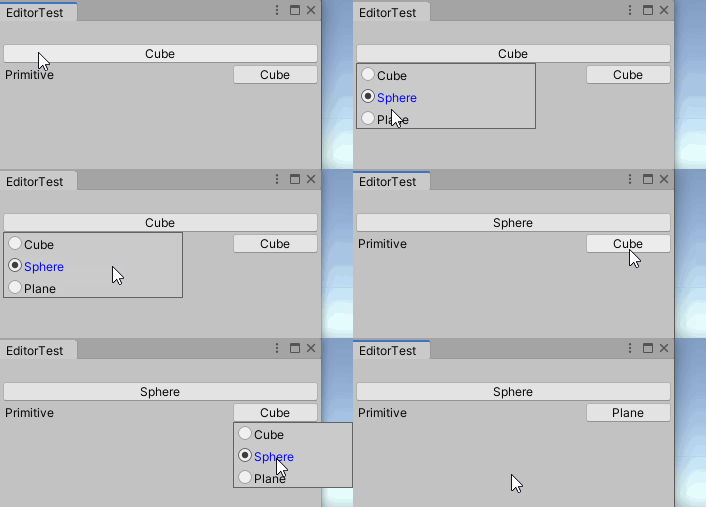
以下の画像より、問題なく動作していることが分かります。
参考ページ
Unity|DOCUMENTATION:PopupWindow
-
前の記事
ラジオボタンの作成(Editor拡張) 2020.07.01
-
次の記事
FloatFieldの作成 その2(Editor拡張) 2020.08.11