キャラクターの移動とカメラコントローラー
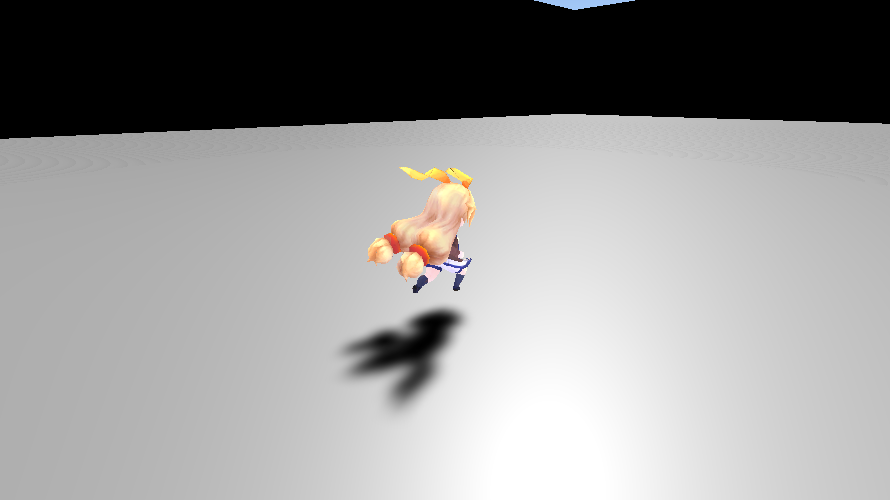
Charactor Controllerを用いたキャラクターの移動とカメラをコントロールするScriptの作成をしました。
Script
WASDキーで前後左右斜めに移動できます。マウス移動でプレイヤー及びカメラの向きを変更、マウスホイールでカメラのズームイン/アウトができます。また、矢印キーでカメラ位置の調整ができます。
using System.Collections;
using System.Collections.Generic;
using UnityEngine;

public class PlayerController : MonoBehaviour
{
    private Transform trf_player;
    private CharacterController controller;
    private Animator anim;

    //カメラ関連
    private float sub_radius;
    private float angle_x, angle_y = -45.0f, radius = 9.0f;
    private const float radius_min = 0.1f, radius_max = 15.0f, radius_speed = 3.0f, offset_speed = 1.8f;
    private Vector2 mouse_speed = new Vector2(1.0f, 1.5f);
    private Vector3 v3_camera_offset_h = new Vector3(0.0f, 0.0f, 0.0f);
    private Vector3 v3_camera_offset_v = new Vector3(0.0f, 0.5f, 0.0f);
    private Transform trf_main_camera;
    private LayerMask layer_mask = 1;

    //プレイヤーの移動や回転
    private float sub_rot_angle, player_angle;
    private float forward_speed = 6.0f, back_speed = 2.0f, gravity = 1.0f, rot_velocity = 0.0f;
    private const float rot_smoothing_time = 0.2f;
    private Vector3 v3_right_dir;
    private Vector3 move_dir = Vector3.zero;
    private Vector2 camera_offset_range = new Vector2(2.0f, 0.1f);
    private Quaternion rot_player;

    // Start is called before the first frame update
    void Start()
    {
        trf_player = gameObject.transform;
        controller = gameObject.GetComponent();
        anim = gameObject.GetComponent();

        trf_main_camera = Camera.main.transform;
        trf_main_camera.position = new Vector3(0.0f, 3.0f, -3.0f) + trf_player.position;

        sub_radius = radius;
        rot_player = trf_player.rotation;
        sub_rot_angle = 0.0f;
        v3_right_dir = trf_player.right;

        /* カメラの障害物ではないレイヤーを設定 */
        layer_mask = ~(1 << LayerMask.NameToLayer("Water"));
        layer_mask &= ~(1 << LayerMask.NameToLayer("Player"));
    }

    //移動キーが押されたときのプレイヤーの回転
    private void PlayerRotation(float angle)
    {
        sub_rot_angle = Mathf.SmoothDamp(sub_rot_angle, angle, ref rot_velocity, rot_smoothing_time);
        trf_player.rotation = rot_player * Quaternion.AngleAxis(sub_rot_angle, Vector3.up);
    }

    // Update is called once per frame
    void Update()
    {
        float h = Input.GetAxis("Horizontal_2");
        float v = Input.GetAxis("Vertical_2");
        angle_x = Input.GetAxis("Mouse X") * mouse_speed.x;
        angle_y -= Input.GetAxis("Mouse Y") * mouse_speed.y;
        angle_y = Mathf.Clamp(angle_y, -179.0f, -1.0f);

        float speed = forward_speed;

        bool flg_h = Input.GetButton("Horizontal_2");
        bool flg_v = Input.GetButton("Vertical_2");

        if (controller.isGrounded)
        {
            if (flg_h && flg_v)
            {
                if (Mathf.Abs(v) < Mathf.Abs(h) && v > 0.0f)
                {
                    v = Mathf.Abs(h);
                }
                //斜め移動
                if (h * v > 0.0f)
                {
                    PlayerRotation(45.0f);
                }
                else
                {
                    PlayerRotation(-45.0f);
                }
                if (v < 0.0f)
                {
                    speed = back_speed;
                }
                move_dir = new Vector3(0.0f, 0.0f, v);
            }
            //横移動
            else if (flg_h)
            {
                if (Mathf.Abs(h) < v)
                {
                    h = Mathf.Abs(v) * Mathf.Sign(h);
                }
                if (h > 0.0f)
                {
                    PlayerRotation(90.0f);
                }
                else
                {
                    PlayerRotation(-90.0f);
                }
                move_dir = new Vector3(0.0f, 0.0f, Mathf.Abs(h));
            }
            //前後移動
            else if (flg_v)
            {
                if (Mathf.Abs(v) < Mathf.Abs(h) && v > 0.0f)
                {
                    v = Mathf.Abs(h);
                }
                PlayerRotation(0.0f);
                move_dir = new Vector3(0.0f, 0.0f, v);
                if (v < 0.0f)
                {
                    speed = back_speed;
                }
            }
            else
            {
                //移動キーを離した後に生じる慣性(Input Manager=>grabity)
                move_dir = new Vector3(0.0f, move_dir.y, v);
                if(h != 0.0f && v != 0.0f)
                {
                    if (Mathf.Abs(v) < Mathf.Abs(h))
                    {
                        v = Mathf.Abs(h) * Mathf.Sign(v);
                    }
                    move_dir = new Vector3(0.0f, move_dir.y, v);
                }
                else if (v == 0.0f && h != 0.0f)
                {
                    move_dir = new Vector3(0.0f, move_dir.y, Mathf.Abs(h));
                }

                if (v < 0.0f)
                {
                    speed = back_speed;
                }
            }
        }
        rot_player *= Quaternion.AngleAxis(angle_x, Vector3.up);    //マウス操作によるプレイヤーの回転更

        move_dir.y -= gravity * Time.deltaTime;
        Vector3 t_dir = trf_player.TransformDirection(move_dir) * speed;
        controller.Move(t_dir * Time.deltaTime);

        anim.SetFloat("unity_chan", Vector3.Magnitude(new Vector3(t_dir.x, 0.0f, t_dir.z)));
    }

    private void LateUpdate()
    {
        /* カメラの中心を移動 */
        Vector3 v3_temp_offset_h = v3_camera_offset_h;
        Vector3 v3_temp_offset_v = v3_camera_offset_v;
        v3_camera_offset_h += Input.GetAxisRaw("Camera_Horizontal") * trf_main_camera.right * offset_speed * Time.deltaTime;
        v3_camera_offset_v -= Input.GetAxisRaw("Camera_Vertical") * trf_main_camera.up * offset_speed * Time.deltaTime;

        /* カメラの移動範囲を限定する */
        //offsetのyが限界値でもカメラが下を向いているときに↑キーで動かせるように
        if (trf_main_camera.up.y < 0.3f)
        {
            v3_camera_offset_v.y = Mathf.Clamp(v3_camera_offset_v.y, camera_offset_range.y, camera_offset_range.x);
        }

        float offset_h_magnitude = Vector3.Magnitude(new Vector3(v3_camera_offset_v.x, 0.0f, v3_camera_offset_v.z));

        if (Vector3.Magnitude(v3_camera_offset_h) > camera_offset_range.x || offset_h_magnitude > camera_offset_range.x
                            || v3_camera_offset_v.y > camera_offset_range.x || v3_camera_offset_v.y < camera_offset_range.y)
        {
            v3_camera_offset_h = v3_temp_offset_h;
            v3_camera_offset_v = v3_temp_offset_v;
        }

        v3_camera_offset_h = Quaternion.AngleAxis(angle_x, Vector3.up) * v3_camera_offset_h;
        v3_camera_offset_v = Quaternion.AngleAxis(angle_x, Vector3.up) * v3_camera_offset_v;
        Vector3 v3_center = trf_player.position + v3_camera_offset_h + v3_camera_offset_v;

        /* カメラのズームイン/アウト */
        if (Input.GetAxis("Mouse ScrollWheel") != 0)
        {
            sub_radius -= Input.GetAxis("Mouse ScrollWheel") * radius_speed;
            sub_radius = Mathf.Clamp(sub_radius, radius_min, radius_max);
            radius = sub_radius;
        }

        /* プレイヤーとカメラのの間に障害物があった場合の処理 */
        RaycastHit hit;
        Vector3 v3_camera_pos;
        v3_right_dir = Quaternion.AngleAxis(angle_x, Vector3.up) * v3_right_dir;  //マウス操作による右方向を示すベクトルの回転
        v3_camera_pos = Quaternion.AngleAxis(angle_y, v3_right_dir) * Vector3.up * radius;   //ズームイン/アウト後のカメラ位置
        v3_camera_pos += v3_center;

        if (Physics.Linecast(v3_center, v3_camera_pos, out hit, layer_mask))
        {
            radius = hit.distance + 0.1f;
        }
        else if (radius < sub_radius)
        {
            radius += 10.0f * Time.deltaTime;
            radius = Mathf.Min(radius, sub_radius); //上記処理でradius > subradiusとなったときradius = subradiusとする
        }

        v3_camera_pos = Quaternion.AngleAxis(angle_y, v3_right_dir) * Vector3.up * radius;   //障害物検知後のカメラ位置
        trf_main_camera.position = v3_camera_pos + v3_center;
        trf_main_camera.LookAt(v3_center);
    }
}
このScriptを使用するには、Edit→Project Settings→Input ManagerからHorizontal_2(Negative Button→a、Positive Button→d)、 Vertical_2(Negative Button→s、Positive Button→w) 、 Camera_Horizontal(Negative Button→left、Positive Button→right)及びCamera_Vertical(Negative Button→up、Positive Button→down) を新しく作成する必要があります。また、Charactor Controllerも必要となります。
キャラクターの移動
Input.GetButtonによって得られる値と Input.GetAxisによって得られる値(h、v)から 移動方向(前後、横及び斜め)を判別しています。
float h = Input.GetAxis("Horizontal_2");
float v = Input.GetAxis("Vertical_2");
・・・
bool flg_h = Input.GetButton("Horizontal_2");
bool flg_v = Input.GetButton("Vertical_2");
・・・
if (flg_h && flg_v)
{
・・・
    //斜め移動
    if (h * v > 0.0f)
    {
・・・
    }
}
//横移動
else if (flg_h)
{
・・・
    if (h > 0.0f)
    {
・・・
    }
    move_dir = new Vector3(0.0f, 0.0f, Mathf.Abs(h));
}
//前後移動
else if (flg_v)
{
・・・
}
移動方向を判別した後に、その移動方向へプレイヤーを回転させています。
private void PlayerRotation(float angle)
{
    sub_rot_angle = Mathf.SmoothDamp(sub_rot_angle, angle, ref rot_velocity, rot_smoothing_time);
    trf_player.rotation = rot_player * Quaternion.AngleAxis(sub_rot_angle, Vector3.up);
}
横方向から前方もしくは前斜め方向、前方から横方向へ方向転換する際、一度立ち止まってから加速します。例えば、横方向から前方へ方向転換する時、横方向の速度にはh(Input.GetAxis(“Horizontal_2”))を使用しており、また、前方の速度にはv(Input.GetAxis(“Vertical_2”))を使用しています。そのため、横方向から前方へ方向転換した時、v=0なので一旦停止した後に加速となります。これを回避するために以下のコードを入れています。
if (Mathf.Abs(v) < Mathf.Abs(h) && v > 0.0f)
{
    v = Mathf.Abs(h);
}
・・・
if (Mathf.Abs(h) < v)
{
    h = Mathf.Abs(v) * Mathf.Sign(h);
}
・・・
if (Mathf.Abs(v) < Mathf.Abs(h) && v > 0.0f)
{
    v = Mathf.Abs(h);
}
Input.GetAxisはキーが離されたときすぐに0となるわけでなく、gravityの値に応じて徐々に減少していきます。そのため、キーが離されたとき移動速度が0とならないように以下のコードを入れています。
move_dir = new Vector3(0.0f, move_dir.y, v);
if(h != 0.0f && v != 0.0f)
{
    if (Mathf.Abs(v) < Mathf.Abs(h))
    {
        v = Mathf.Abs(h) * Mathf.Sign(v);
    }
    move_dir = new Vector3(0.0f, move_dir.y, v);
}
else if (v == 0.0f && h != 0.0f)
{
    move_dir = new Vector3(0.0f, move_dir.y, Mathf.Abs(h));
}
カメラコントローラー
カメラの移動
v3_right_dirはプレイヤーが前方(wキーもしくはsキーを押したときに向く方向)を向いたときに右方向を示すベクトルです。このベクトルを軸として鉛直方向を示すベクトル(Vector3.up * radius)を回転させることでカメラの位置を決定しています。
v3_right_dir = Quaternion.AngleAxis(angle_x, Vector3.up) * v3_right_dir;  //マウス操作による右方向を示すベクトルの回転
v3_camera_pos = Quaternion.AngleAxis(angle_y, v3_right_dir) * Vector3.up * radius;   //ズームイン/アウト後のカメラ位置
また、カメラのズームイン/アウトは
if (Input.GetAxis("Mouse ScrollWheel") != 0)
{
    sub_radius -= Input.GetAxis("Mouse ScrollWheel") * radius_speed;
    sub_radius = Mathf.Clamp(sub_radius, radius_min, radius_max);
    radius = sub_radius;
}
で行っています。
カメラの中心を移動
矢印キーで カメラの中心を移動できます。中心の移動範囲は直方体内側とります。v3_camera_offset_hは中心から横方向へどれだけ移動したかを示すベクトルです。また、v3_camera_offset_vのx、z成分が前後方向をy成分が上下方向へどれだけ移動したかを示しています。この二つのベクトルを使用することでカメラの移動範囲を制限する処理を行っています。
/* カメラの中心を移動 */
Vector3 v3_temp_offset_h = v3_camera_offset_h;
Vector3 v3_temp_offset_v = v3_camera_offset_v;
v3_camera_offset_h += Input.GetAxisRaw("Camera_Horizontal") * trf_main_camera.right * offset_speed * Time.deltaTime;
v3_camera_offset_v -= Input.GetAxisRaw("Camera_Vertical") * trf_main_camera.up * offset_speed * Time.deltaTime;

/* カメラの移動範囲を限定する */
//offsetのyが限界値でもカメラが下を向いているときに↑キーで動かせるように
if (trf_main_camera.up.y < 0.3f)
{
    v3_camera_offset_v.y = Mathf.Clamp(v3_camera_offset_v.y, camera_offset_range.y, camera_offset_range.x);
}

float offset_h_magnitude = Vector3.Magnitude(new Vector3(v3_camera_offset_v.x, 0.0f, v3_camera_offset_v.z));

if (Vector3.Magnitude(v3_camera_offset_h) > camera_offset_range.x || offset_h_magnitude > camera_offset_range.x
                    || v3_camera_offset_v.y > camera_offset_range.x || v3_camera_offset_v.y < camera_offset_range.y)
{
    v3_camera_offset_h = v3_temp_offset_h;
    v3_camera_offset_v = v3_temp_offset_v;
}

v3_camera_offset_h = Quaternion.AngleAxis(angle_x, Vector3.up) * v3_camera_offset_h;
v3_camera_offset_v = Quaternion.AngleAxis(angle_x, Vector3.up) * v3_camera_offset_v;
Vector3 v3_center = trf_player.position + v3_camera_offset_h + v3_camera_offset_v;
障害物の検知と処理
Linecastによってプレイヤーとカメラの間に障害物があるかを検出しています。障害物を検出した際、radius = hit.distance + 0.1fとしていますが、もし、radius = hit.distanceであると、次フレームでLinecastに接触しなくなりradius += 10.0f * Time.deltaTimeが実行されカメラが少しズームアウトされ、さらに次フレームでLinecastと接触してradius = hit.distanceとなります。これが繰り返されるためカメラがガタガタ震えるようになります。そのため、少しカメラを障害物にめり込ませることでこれを回避しています。
if (Physics.Linecast(v3_center, v3_camera_pos, out hit, layer_mask))
{
    radius = hit.distance + 0.1f;
}
else if (radius < sub_radius)
{
    radius += 10.0f * Time.deltaTime;
    radius = Mathf.Min(radius, sub_radius);
}
その他
カメラに関わる処理はLateUpdate内に書いています。もし、カメラの移動をUpdate内に書くと、Scriptからオブジェクトの移動を行っている場合、オブジェクトが移動してからカメラが移動するのか、カメラが移動してからオブジェクトが動くのかが決まっていません。そのため、ガタツキ等が生じたりします。そのため、LateUpdate内にカメラの移動処理を書いています。
実行結果
実行結果は以下の通りです。コントロールキーを押すとカーソルがロックされます。もう一度、コントロールキーを押すと解除されます。
本当は、斜め後ろ方向から横方向へ方向転換する際、速度を0から加速するようにしたかったのですが、速度をそのまま保ってしまいます。

このコンテンツはユニティちゃんライセンス条項の元に提供されています
-
前の記事

Scriptによるレンダーテクスチャへの数値書き込みについて 2019.11.06
-
次の記事
キャラクターの移動(Input.GetAxisRaw) 2019.12.01
Warning: Trying to access array offset on value of type bool in /home/empty/karanokan.info/public_html/wp-content/themes/lionblog/single.php on line 192
Warning: Trying to access array offset on value of type bool in /home/empty/karanokan.info/public_html/wp-content/themes/lionblog/single.php on line 193
Warning: Trying to access array offset on value of type bool in /home/empty/karanokan.info/public_html/wp-content/themes/lionblog/single.php on line 194