MaterialのShaderプロパティーを表示 その1(Editor拡張)
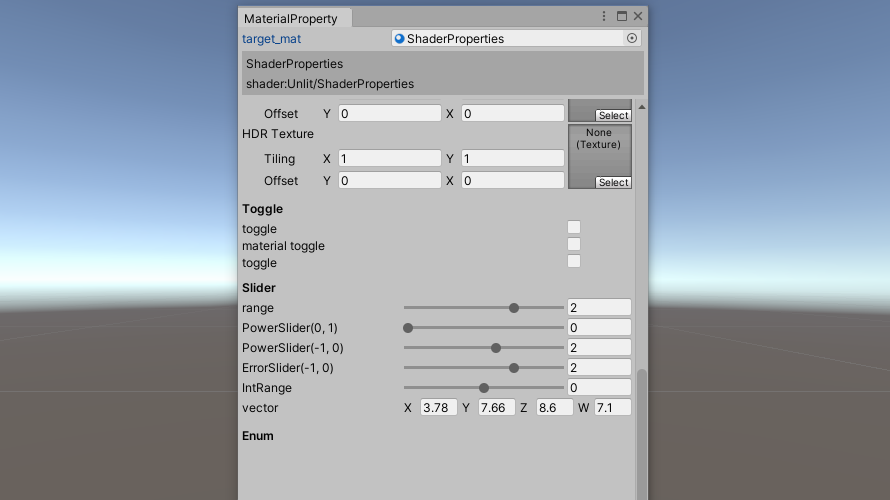
Inspectorに表示されるようなMaterialのShaderプロパティをEditorWindowで表示するScriptを作成しました。基本的なAttributeにも対応しています。
※コントロールの作成部分は次の記事、「MaterialのShaderプロパティーを表示 その2(Editor拡張)」に記述しています。
Script
作成したScriptは以下の通りです。
void ShaderPropertyWindow()
{
Event event_current = Event.current;
//shader property
if (target_mat != null)
{
/* shader properties */
Shader target_shader = target_mat.shader;
int shader_property_count = ShaderUtil.GetPropertyCount(target_shader);
EditorGUILayout.BeginVertical(GUI.skin.box);
{
EditorGUILayout.LabelField(target_mat.name);
EditorGUILayout.LabelField("shader:" + target_shader.name);
}
EditorGUILayout.EndVertical();
scroll_shader = EditorGUILayout.BeginScrollView(scroll_shader, GUILayout.Width(position.width), GUILayout.Height(position.height - 72));
{
for (int i = 0; i < shader_property_count; i++)
{
ShaderUtil.ShaderPropertyType prop_type = ShaderUtil.GetPropertyType(target_shader, i);
string prop_name = ShaderUtil.GetPropertyName(target_shader, i);
string description = ShaderUtil.GetPropertyDescription(target_shader, i);
int index = target_shader.FindPropertyIndex(prop_name);
/* Attribute */
//hidden inspector
if ((target_shader.GetPropertyFlags(index) & UnityEngine.Rendering.ShaderPropertyFlags.HideInInspector) == UnityEngine.Rendering.ShaderPropertyFlags.HideInInspector)
{
continue;
}
string[] shader_attribs = target_shader.GetPropertyAttributes(index); //プロパティのAttributeを受け取る(GetPropertyFlagsで取得可能なAttribute以外)
//Attributeは最後に記述されているものが優先される
//Attributeを種類(attribs)と()内の記述(param)に分ける { PowerSlider(0.5)→attribs = PowerSlider, param = 0.5 }
//Spaceは先に処理を行う
List<string> attribs = new List<string>();
List<string> param = new List<string>();
foreach (string attribute in shader_attribs)
{
//Space
if (attribute.IndexOf("Space") == 0)
{
if (attribute == "Space")
{
EditorGUILayout.Space();
}
else
{
MatchCollection matches = Regex.Matches(attribute, @"(?<=\().*(?=\))"); //括弧内を抽出
if (matches.Count != 0)
{
int space_height;
try
{
space_height = int.Parse(matches[0].Value);
}
catch
{
EditorGUILayout.Space();
break;
}
EditorGUILayout.Space(space_height);
}
}
}
//Header
else if (attribute.IndexOf("Header") == 0)
{
MatchCollection matches = Regex.Matches(attribute, @"(?<=\().*(?=\))"); //括弧内を抽出
if (matches.Count != 0)
{
DrawHeader(matches[0].Value, style_header);
}
}
//SpaceとHeader以外
else
{
MatchCollection matches = Regex.Matches(attribute, @".*(?=\()"); //括弧の前を抽出
string atr;
if (matches.Count != 0)
{
atr = matches[0].Value;
attribs.Add(atr);
MatchCollection param_matches = Regex.Matches(attribute, @"(?<=\().*(?=\))"); //括弧内を抽出
if (param_matches.Count != 0)
{
param.Add(param_matches[0].Value);
}
}
else
{
//括弧がない場合
attribs.Add(attribute);
param.Add(null);
}
}
}
if(attribs.Count != 0)
{
attribs.Reverse(); //Attributeは最後に記述されているものが優先されるので反転
param.Reverse();
}
/* Controls */
switch (prop_type)
{
case ShaderUtil.ShaderPropertyType.Color:
Color col = CustomEditorGUI.ColorField(description, target_mat.GetColor(prop_name), style_label);
target_mat.SetColor(prop_name, col);
break;
case ShaderUtil.ShaderPropertyType.Vector:
Vector4 vec = CustomEditorGUI.Vector4Field(description, target_mat.GetVector(prop_name), style_label, style_text_field, event_current);
target_mat.SetVector(prop_name, vec);
break;
case ShaderUtil.ShaderPropertyType.Float:
float val = 0f;
bool control_created = false;
if (attribs.Count != 0)
{
for (int j = 0; j < attribs.Count; j++)
{
//Toggle
if (attribs[j] == "Toggle" || attribs[j] == "MaterialToggle")
{
val = target_mat.GetFloat(prop_name);
bool flg = (val != 0) ? true : false; //shaderから得られた数値によりboolを決定
flg = CustomEditorGUI.Toggle(description, flg, style_label, style_toggle);
val = (flg) ? 1 : 0; //コントロールで変更されたboolに応じて数値を決定
//キーワードが設定されてない場合
if (param[j] == null)
{
if (flg)
{
target_mat.EnableKeyword(prop_name.ToUpper() + "_ON");
}
else
{
target_mat.DisableKeyword(prop_name.ToUpper() + "_ON");
}
}
//キーワードが設定されている場合
else
{
if (flg)
{
target_mat.EnableKeyword(param[j]);
}
else
{
target_mat.DisableKeyword(param[j]);
}
}
control_created = true;
break;
}
//Enum
else if (attribs[j] == "Enum")
{
val = target_mat.GetFloat(prop_name);
string temp = Regex.Replace(param[j], @"\s", ""); //スペースの削除
string[] enum_temp = temp.Split(',');
if (enum_temp.Length % 2 != 0) break; //名前と数値が組になっていない場合は無効なAttributeとして処理する。
int enum_length = enum_temp.Length / 2;
//名前と数値に分ける。数値部分の文字がfloatへ変更できなかった場合は無効なAttributeとして処理する。
string[] enum_name = new string[enum_length];
float[] enum_value = new float[enum_length];
bool error = false;
int selected = 0;
for (int k = 0; k < enum_length; k++)
{
enum_name[k] = enum_temp[k * 2];
try
{
enum_value[k] = float.Parse(enum_temp[k * 2 + 1]);
}
catch
{
error = true;
}
if (val == enum_value[k])
{
selected = k;
}
}
if (error) continue;
//Enumの表示
selected = EditorPopUpWindow.Create(description, selected, enum_name, style_label, style_button, style_popup_label, color_popup_background, PopUpPosition.Center, this);
val = enum_value[selected];
control_created = true;
break;
}
//KeywordEnum
else if (attribs[j] == "KeywordEnum")
{
val = target_mat.GetFloat(prop_name);
string temp = Regex.Replace(param[j], @"\s", "");
string[] enum_name = temp.Split(',');
int selected = (int)val;
selected = EditorPopUpWindow.Create(description, selected, enum_name, style_label, style_button, style_popup_label, PopUpPosition.Center, this);
val = selected;
//有効にするキーワード以外はDisableで無効にする必要がある
target_mat.SetFloat(prop_name, selected);
for (int k = 0; k < enum_name.Length; k++)
{
if (k == selected)
{
target_mat.EnableKeyword(prop_name.ToUpper() + "_" + enum_name[k].ToUpper());
}
else
{
target_mat.DisableKeyword(prop_name.ToUpper() + "_" + enum_name[k].ToUpper());
}
}
control_created = true;
break;
}
}
}
//Attributeがないか無効なAttributeの場合は通常のfloat fieldで表示
if (control_created == false)
{
val = CustomEditorGUI.FloatField(description, target_mat.GetFloat(prop_name), style_label, style_text_field, event_current);
}
target_mat.SetFloat(prop_name, val);
break;
case ShaderUtil.ShaderPropertyType.Range:
float min = ShaderUtil.GetRangeLimits(target_shader, i, 1);
float max = ShaderUtil.GetRangeLimits(target_shader, i, 2);
float slider_val = target_mat.GetFloat(prop_name);
bool slider_created = false; //power sliderかint sliderが作成されたかの判定用
if (attribs.Count != 0)
{
for (int j = 0; j < attribs.Count; j++)
{
//power sliderの作成。()ないが数値でなかった場合は無効なAttributeとして処理する(通常のsliderで表示)
float power = 1f;
if (attribs[j] == "PowerSlider")
{
try
{
power = float.Parse(param[j]);
}
catch
{
continue;
}
slider_val = target_mat.GetFloat(prop_name);
slider_val = CustomEditorGUI.PowerSlider(description, slider_val, min, max, power, style_label, style_slider, style_slider_thumb, style_text_field, event_current);
slider_created = true;
break;
}
else if (attribs[j] == "IntRange")
{
slider_val = CustomEditorGUI.IntSlider(description, (int)slider_val, (int)min, (int)max, style_label, style_slider, style_slider_thumb, style_text_field, event_current);
slider_created = true;
break;
}
}
}
//Attributeがないか無効なAttributeの場合
if (!slider_created)
{
slider_val = CustomEditorGUI.Slider(description, slider_val, min, max, style_label, style_slider, style_slider_thumb, style_text_field, event_current);
}
target_mat.SetFloat(prop_name, slider_val);
break;
case ShaderUtil.ShaderPropertyType.TexEnv:
//Texture
UnityEngine.Rendering.TextureDimension textureDimension = target_shader.GetPropertyTextureDimension(index);
if ((target_shader.GetPropertyFlags(index) & UnityEngine.Rendering.ShaderPropertyFlags.NoScaleOffset) == UnityEngine.Rendering.ShaderPropertyFlags.NoScaleOffset)
{
switch (textureDimension)
{
case UnityEngine.Rendering.TextureDimension.Tex2D:
Texture tex = CustomEditorGUI.TextureField(description, target_mat.GetTexture(prop_name), style_label);
target_mat.SetTexture(prop_name, tex);
break;
case UnityEngine.Rendering.TextureDimension.Cube:
Cubemap cubemap = CustomEditorGUI.CubemapField(description, target_mat.GetTexture(prop_name) as Cubemap, style_label);
target_mat.SetTexture(prop_name, cubemap);
break;
case UnityEngine.Rendering.TextureDimension.Tex3D:
Texture3D tex3d = CustomEditorGUI.VolumeTextureField(description, target_mat.GetTexture(prop_name) as Texture3D, style_label);
target_mat.SetTexture(prop_name, tex3d);
break;
case UnityEngine.Rendering.TextureDimension.Tex2DArray:
Texture2DArray tex2darray = CustomEditorGUI.Texture2DArrayField(description, target_mat.GetTexture(prop_name) as Texture2DArray, style_label);
target_mat.SetTexture(prop_name, tex2darray);
break;
}
}
else
{
Vector2 scale = target_mat.GetTextureScale(prop_name);
Vector2 offset = target_mat.GetTextureOffset(prop_name);
switch (textureDimension)
{
case UnityEngine.Rendering.TextureDimension.Tex2D:
Texture tex = CustomEditorGUI.TextureField(description, target_mat.GetTexture(prop_name), style_label, style_text_field, ref scale, ref offset, event_current);
target_mat.SetTexture(prop_name, tex);
break;
case UnityEngine.Rendering.TextureDimension.Cube:
Cubemap cubemap = CustomEditorGUI.CubemapField(description, target_mat.GetTexture(prop_name) as Cubemap, style_label, style_text_field, ref scale, ref offset, event_current);
target_mat.SetTexture(prop_name, cubemap);
break;
case UnityEngine.Rendering.TextureDimension.Tex3D:
Texture3D tex3d = CustomEditorGUI.VolumeTextureField(description, target_mat.GetTexture(prop_name) as Texture3D, style_label, style_text_field, ref scale, ref offset, event_current);
target_mat.SetTexture(prop_name, tex3d);
break;
case UnityEngine.Rendering.TextureDimension.Tex2DArray:
Texture2DArray tex2darray = CustomEditorGUI.Texture2DArrayField(description, target_mat.GetTexture(prop_name) as Texture2DArray, style_label, style_text_field, ref scale, ref offset, event_current);
target_mat.SetTexture(prop_name, tex2darray);
break;
}
target_mat.SetTextureScale(prop_name, scale);
target_mat.SetTextureOffset(prop_name, offset);
}
break;
default:
break;
}
}
}
EditorGUILayout.EndScrollView();
}
else
{
GUILayout.Label("Properties", style_label);
}
}
private void DrawHeader(string label, GUIStyle style_header)
{
EditorGUILayout.Space();
EditorGUILayout.LabelField(label, style_header);
}
プロパティの表示に必要なデータの取得
material(target_mat)からshaderを読み込み、ShaderUtil.GetPropertyCountでshaderのプロパティ数を取得します。
Shader target_shader = target_mat.shader;
int shader_property_count = ShaderUtil.GetPropertyCount(target_shader);
boxを作成し、そこへmaterialの名前とshaderの名前を表示します。
EditorGUILayout.BeginVertical(GUI.skin.box);
{
    EditorGUILayout.LabelField(target_mat.name);
    EditorGUILayout.LabelField("shader:" + target_shader.name);
}
EditorGUILayout.EndVertical();
プロパティの型(prop_type)、名前(prop_name)及び表示用の名前(description)を取得します。shaderにはprop_name (description, prop_type) = …のように記述されています。さらにprop_nameからプロパティのインデックスを取得します(index)。
ShaderUtil.ShaderPropertyType prop_type = ShaderUtil.GetPropertyType(target_shader, i);
string prop_name = ShaderUtil.GetPropertyName(target_shader, i);
string description = ShaderUtil.GetPropertyDescription(target_shader, i);
int index = target_shader.FindPropertyIndex(prop_name);
Attributeの取得と前処理
Attributeを取得し、それに応じてコントロールを変更します。HideInInspector、Space及びHeaderに関してはプロパティのコントロールを表示する前に処理を行う必要があります。また、Attributeはその種類に応じて()内に追加で記述が行われています。そのためAttributeの種類と追加の記述部分を分けます。これらをコントロールの表示を行う前に処理を行います。
Attributeの取得
GetPropertyAttributesによりshaderの指定したインデックスにおけるプロパティのAttributeを全て取得します。
string[] shader_attribs = target_shader.GetPropertyAttributes(index);HideInInspector
HideInInspectorはプロパティを非表示にするAttributeです。HideInInspectorはshader.GetPropertyFlagsで取得できます。これを用いてHideInInspectorが指定されていた場合はcontinueによって処理を飛ばすことでプロパティが非表示となるように処理を行っています。
if ((target_shader.GetPropertyFlags(index) & UnityEngine.Rendering.ShaderPropertyFlags.HideInInspector) == UnityEngine.Rendering.ShaderPropertyFlags.HideInInspector)
{
    continue;
}
Space
Spaceのみ記述されている場合はEditorGUILayout.Spaceを実行し、Space(数値)の場合は数値に応じてSpaceの高さを変更しています。数値の取得にはRegex.Matchesにより正規表現を用いて()内の数値を取り出しています。取得した数値部分はstring型なのでint.Parseによってint型へ変換しています。この際、int型へ変換できなかった場合は数値を指定せずにEditorGUILayout.Spaceを実行するようにしています。
if (attribute.IndexOf("Space") == 0)
{
    if (attribute == "Space")
    {
        EditorGUILayout.Space();
    }
    else
    {
        MatchCollection matches = Regex.Matches(attribute, @"(?<=\().*(?=\))");
        if (matches.Count != 0)
        {
            int space_height;
            try
            {
                space_height = int.Parse(matches[0].Value);
            }
            catch
            {
                EditorGUILayout.Space();
                break;
            }
            EditorGUILayout.Space(space_height);
        }
    }
}
Header
Headerの処理です。先ほどと同様に正規表現を用いて()内を取得し、これを用いてHeaderの追加を行っています。
else if (attribute.IndexOf("Header") == 0)
{
    MatchCollection matches = Regex.Matches(attribute, @"(?<=\().*(?=\))");
    if (matches.Count != 0)
    {
        DrawHeader(matches[0].Value, style_header);
    }
}
・・・
private void DrawHeader(string label, GUIStyle style_header)
{
    EditorGUILayout.Space();
    EditorGUILayout.LabelField(label, style_header);
}
その他のAttribute
コントロールの表示に関わるAttributeについては、予めAttributeの種類と()内の記述部分に分けます。例えば、PowerSlider(0.5)が指定されていた場合、PowerSlider(attribs)と0.5(param)へ分けます。また、Attributeは後ろに記述されているものが優先されるようなので、attribsとparamの順番を逆順にしています。
{
    MatchCollection matches = Regex.Matches(attribute, @".*(?=\()");
    string atr;
    if (matches.Count != 0)
    {
        atr = matches[0].Value;
        attribs.Add(atr);
        MatchCollection param_matches = Regex.Matches(attribute, @"(?<=\().*(?=\))");
        if (param_matches.Count != 0)
        {
            param.Add(param_matches[0].Value);
        }
    }
    else
    {
        attribs.Add(attribute);
        param.Add(null);
    }
}

if(attribs.Count != 0)
{
    attribs.Reverse();
    param.Reverse();
}※コントロールの作成部分は次の記事、「MaterialのShaderプロパティーを表示 その2(Editor拡張)」に記述しています。
-
前の記事
自作GUIまとめ(Editor拡張) 2020.09.05
-
次の記事
MaterialのShaderプロパティーを表示 その2(Editor拡張) 2020.10.22